Code
library(reticulate)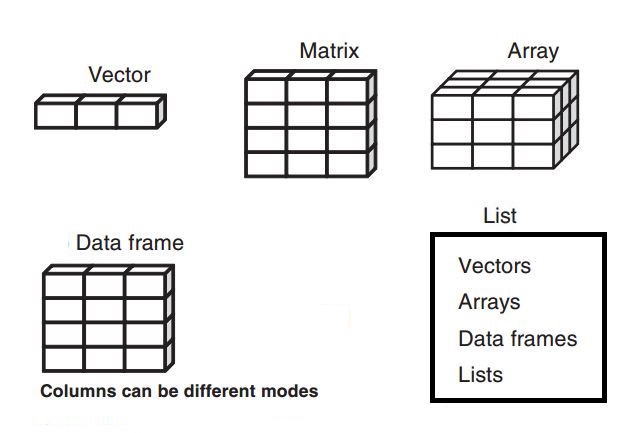
library(reticulate)recommend to use class() over typeof() to check data type
x <- "dataset"
class(x)
[1] "character"x <- 123
class(x)[1] "numeric"x <- 3 + 2i
class(x)[1] "complex"x <- TRUE
class(x)[1] "logical"One number is a vector too.
y <- 1
y
[1] 1class(y)[1] "numeric"y <- c(1,2,3)
y[1] 1 2 3class(y)[1] "numeric"create vector
seq(from = 2, to = 14, by = 2) [1] 2 4 6 8 10 12 14rep(x = 1.5, times = 4) [1] 1.5 1.5 1.5 1.5append vector
x=c(1,2,3)
y=c(4,5,6)
z=c(x,y)
z
[1] 1 2 3 4 5 6calculate vector
x=c(1,2,3,4,5)sum(x)[1] 15mean(x)[1] 3y=x+10select vector element
y[1] 11 12 13 14 15select the first one
y[1][1] 11# or
head(y,1)[1] 11exclude the first one
y[-1][1] 12 13 14 15y[length(y)][1] 15# or
tail(y,1)[1] 15select 3 to 5
y[c(3:5)][1] 13 14 15select bigger than 2 element
y[y>2][1] 11 12 13 14 15Matrix is two dimensions data only with number.
matrix001 <- matrix(1:16, nrow = 4)
matrix001
[,1] [,2] [,3] [,4]
[1,] 1 5 9 13
[2,] 2 6 10 14
[3,] 3 7 11 15
[4,] 4 8 12 16is.matrix(matrix001)[1] TRUEmatrix002=matrix001+matrix001
matrix002 [,1] [,2] [,3] [,4]
[1,] 2 10 18 26
[2,] 4 12 20 28
[3,] 6 14 22 30
[4,] 8 16 24 32matrix002[1,2][1] 10matrix002[2,][1] 4 12 20 28matrix002[,3][1] 18 20 22 24Dataframe is two dimensions data mixed with number and string.
height <- c(180, 155, 160, 167, 181)
weight <- c(65, 50, 52, 58, 70)
names <- c("Joanna", "Charlotte", "Helen", "Karen", "Amy")

y <- data.frame(height = height, weight = weight, names = names)
class(y)
[1] "data.frame"class(y$height)[1] "numeric"class(y$names)[1] "character"As array is made up matrices in multiple dimensions.
# Create two vectors of different lengths.
vector1 <- c(9,1,0)
vector2 <- c(6,0,11,3,14,1,2,6,9)
array2 <- array(c(vector1,vector2),dim = c(3,3,2))

array2
, , 1
[,1] [,2] [,3]
[1,] 9 6 3
[2,] 1 0 14
[3,] 0 11 1
, , 2
[,1] [,2] [,3]
[1,] 2 9 6
[2,] 6 1 0
[3,] 9 0 11y <- list(c("black", "yellow", "orange"),
c(TRUE, TRUE, FALSE, TRUE, FALSE, FALSE),
matrix(1:6, nrow = 3))
class(y)[1] "list"vector1=c(1,2,3)
for (i in vector1){
print('number is:')
print(i)
}[1] "number is:"
[1] 1
[1] "number is:"
[1] 2
[1] "number is:"
[1] 3order=6
while (order>3){
print(order)
order=order-1
}[1] 6
[1] 5
[1] 4a=16
if (a>10){
print ("a>10")
}else{
print("a<=10")
}[1] "a>10"it will break out of the loop when i=2
vector1=c(1,2,3)
for (i in vector1){
print('number is:')
if (i ==2){break}
print(i)
}[1] "number is:"
[1] 1
[1] "number is:"it will break out of the loop when order=4
order=8
while (order>2){
print(order)
if (order ==4){break}
order=order-1
}[1] 8
[1] 7
[1] 6
[1] 5
[1] 4http://adv-r.had.co.nz/Data-structures.html#vectors
https://yards.albert-rapp.de/
Loops using R programming: https://www.youtube.com/watch?v=UvopClD98LQ